October 5, 2026
Multi-Language AI Scribe: How Cognivolt Works in Any Language
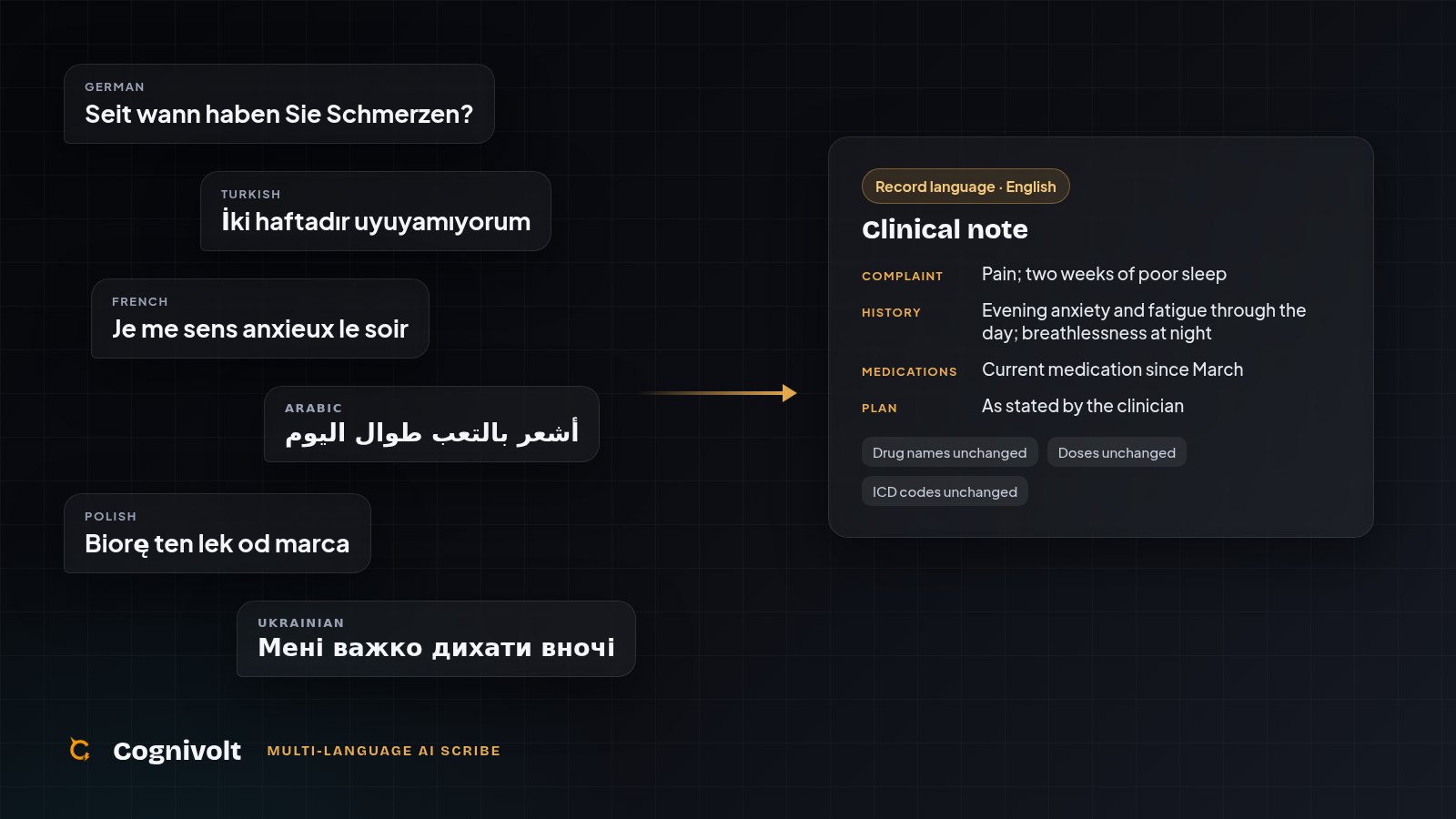
Walk into almost any clinic in Europe and listen for a morning. A GP in Berlin moves from German to Turkish between patients. A psychiatrist in Paris sees a patient who is more comfortable in Arabic. In Brussels it is French, then Dutch, then English. In London the waiting room might hold Polish, Punjabi, Romanian and Portuguese before lunch. Since 2022, clinics across the continent have been seeing Ukrainian-speaking patients every day.
This is simply what modern medicine sounds like. And it is exactly where most AI scribes start to struggle, and where a multilingual AI medical scribe earns its place.
Why language matters so much for an AI scribe
A scribe has one job: capture what was said, accurately, and turn it into a record you can trust. If it only really works in one language, it fails at that job for every patient who speaks another one, and those are often the patients where getting the details right matters most.
It is not only about the language itself. Accents, regional pronunciation, and patients who drift between two languages in the same sentence are part of everyday practice. A tool that quietly assumes everyone is speaking standard English will miss things, and a missed symptom or a misheard medication is not a cosmetic error. It is a clinical one.
That is why multi-language support is not a nice extra for a scribe. It is the difference between a tool that works for some of your patients and one that works for all of them.
How Cognivolt handles it
Cognivolt treats language as two separate decisions, and that is what makes it different.
1. The consultation: whatever language your patient speaks.
Cognivolt can handle most of the world's languages. You never choose an input language. There is nothing to set before the visit and nothing to switch between patients. Cognivolt listens and understands the consultation in the language it actually happens in, whether you record it live, dictate it afterwards, or upload audio.
2. The record: the language you want to keep it in.
This is the part most scribes don't let you control. In Cognivolt you decide what language your notes are written in, independently of what language was spoken. You have two options:
- Same as input. The note is written in the language of the consultation. A consultation in Spanish gives you a note in Spanish.
- Always write in one language. Pick a language, and every note comes out in it, whatever your patient spoke. Consult in Turkish, Arabic or Polish, and keep every chart in German, French or English.
So a GP in Munich can see a Turkish-speaking patient in Turkish and still have a clean German record. A practice in Amsterdam can keep every chart in Dutch, however many languages its patients speak. A psychiatrist in Madrid can keep notes in Spanish for everyone.
Why this makes such a difference in practice
Your records stay consistent. A patient's chart becomes a single, readable history in one language, even if that patient was seen in three different languages over the years. That matters when you look back, and it matters even more when a colleague picks up the case.
Your notes are in the language your colleagues read. The people who read your records, from the colleague covering your patients to the specialist you refer to, read a particular language. Cognivolt writes the note in that language from the start, instead of leaving you to translate it afterwards.
Clinical details are never translated into ambiguity. Drug names, dosages and ICD codes stay in their standard international form in every language. A dose is never reworded, and a code is never localised into something a pharmacy or payer won't recognise.
Nothing comes out half-translated. The language is fixed when a session starts. Change your setting, and it applies from your next session, never in the middle of one. You will never open a note that switches language halfway through.
You can offer every patient the same care. When the tool understands your patient, you can spend the consultation looking at them, not managing the conversation for the software's sake.
One scribe for every clinic, in every country
Because Cognivolt adapts to the language in the room rather than asking the room to adapt to it, the same product works for a solo GP in Lyon, a multilingual practice in Zurich, a telemedicine service seeing patients across borders, or a clinic in Dubai. Each clinician sets their own record language once, and then simply works.
You can keep your records in English, French, German, Spanish, Italian, Portuguese, Dutch, Polish, Ukrainian, Russian, Turkish, Arabic, Persian, Urdu, Hindi, Bengali, Punjabi, Tamil, Telugu, Chinese (Simplified), Japanese, Korean, Malay, Indonesian, Filipino, Azerbaijani, Swahili, Hausa, Yoruba, Amharic or Somali.
Setting it up takes ten seconds
- Open your Cognivolt dashboard.
- Find the Transcript language card, with your other preferences.
- Choose Same as input, or choose Always write in and pick your language.
That's it. Your next session uses it.
Frequently asked questions
Do I need to tell Cognivolt which language my patient speaks?
No. It understands the consultation in whatever language it is spoken.
Can my notes be in a different language from the consultation?
Yes. Choose "Always write in", pick a language, and every note comes out in it.
Are medication names and doses translated?
No. Drug names, dosages and ICD codes always stay in their standard international form.
What is the best AI scribe for multilingual patients?
One that understands the consultation in whatever language it happens in and lets you choose the language of the record separately. Cognivolt does both, and keeps drug names, doses and codes in their international form.
Can every doctor in my practice choose a different record language?
Yes. The setting belongs to each clinician, so everyone can keep notes in the language they work in.
Cognivolt is an AI scribe, clinical decision support and an EMR in one, built for clinicians in all specialties, wherever they practise. See everything it does or how it compares with other AI scribes, or try it free for 14 days, no card needed.