Document. Differentiate. Decide.
Your AI scribe, clinical decision support, and EMR, all in one app.





Trusted by clinicians worldwide: Mental Health Specialists & Medical Doctors
AI Scribe. Decision Support. Full EMR.
Cognivolt records the visit, writes the note, backs your clinical decisions, checks safety before you prescribe, and keeps the complete patient record, all in one product, not four you have to stitch together yourself. Built for every clinician, and deepest where mental health work needs it to be.
AI medical scribe
Turns the consultation into a complete clinical note as you talk. Audio, photos of documents, or typed notes all work, with speakers separated automatically. No consultation length limit, on every plan.
Clinical decision support, built in
Weighs differential considerations against documented diagnostic criteria and specialty guidelines, runs a risk assessment, scores rating scales, and prepares psychoeducation for the patient. Every note and differential is independently checked before you see it.
Automatic safety checks
Cross-checks what you are prescribing against recorded allergies and known drug-drug interactions, and flags side effects reported across visits. Deterministic lookups, not a model’s guess.
A complete EMR
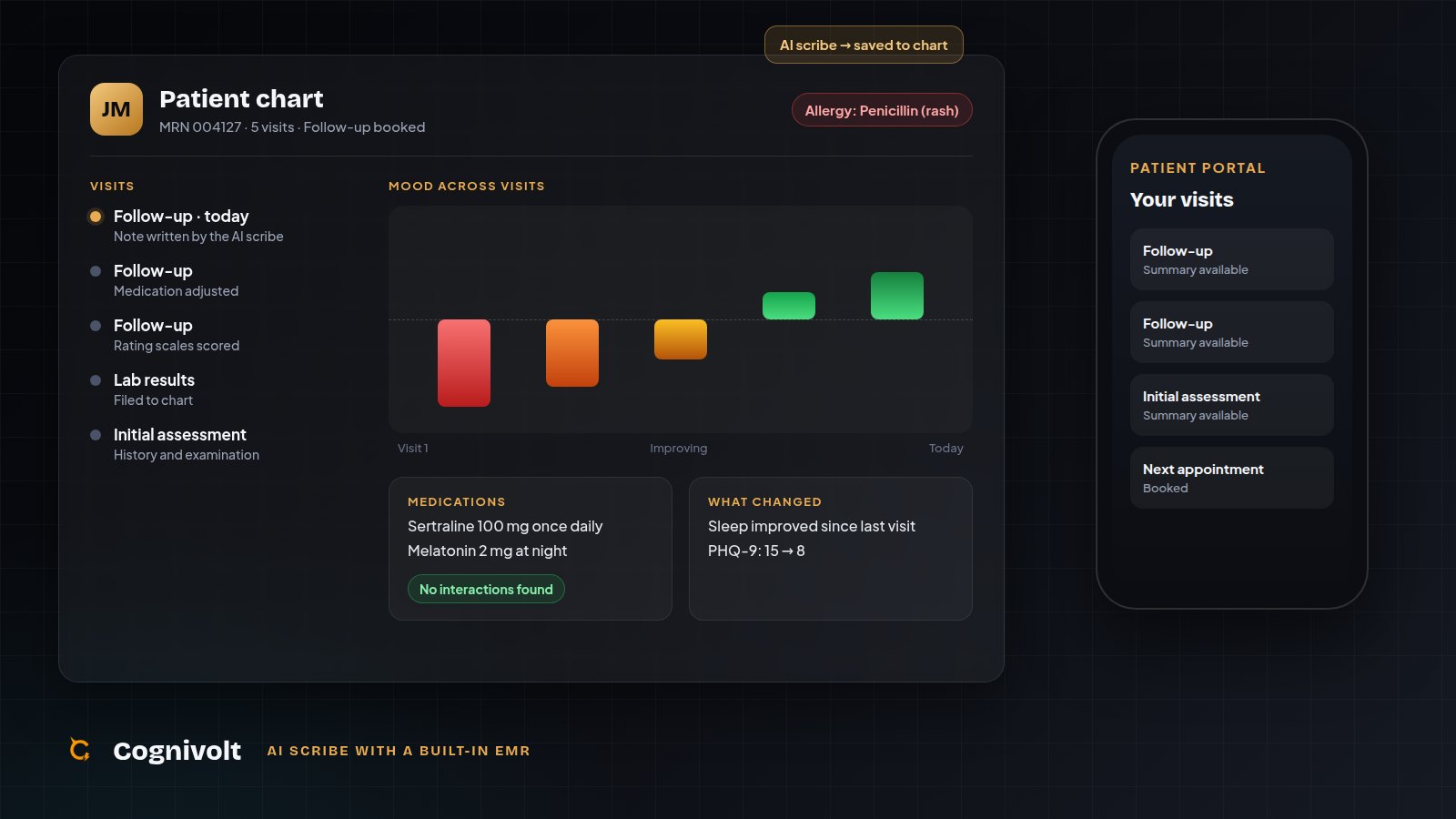
Patient charts, longitudinal history, scheduling, a patient portal, FHIR export and billing codes, all built automatically, because every layer above writes into the same record.
One shared patient history behind every layer: the differential knows what you prescribed last visit, and the safety check knows what the patient reacted to two years ago. And it scales the same way whether it's just you or Cognivolt Enterprise sharing it across a whole practice.
Simple workflow, start to finish.
Set Up
Select the visit type, setting and note format to start the session.

Record
The transcript writes itself in real time as you talk.

Note is Ready
The note is ready before the patient leaves the room.

Enterprise-grade security by default
10+
AI Capabilities Per Session
1000+
Sessions Documented
24/7
AI Availability
14-Day
Free Trial, No Card Required
Cognivolt doesn't cost you money. It makes you money.
Even our top plan runs less than the cost of a single patient session. The time it gives back pays for itself many times over. See it below.
ROI in Money
The one that matters most to your practice
Every session you no longer spend 10-15 minutes charting is time you can spend seeing another patient. Doctors using Cognivolt typically free up enough time to fit a few more patients into every working day, and at your own session fee, that adds up fast. Use the calculator below with your real numbers.
Plug in your own numbers and it updates live.
Illustrative estimate based on the numbers above, not a guarantee of income. Actual results depend on your practice, patient volume, and local fees.
Your estimated monthly upside
Net monthly gain
$7,705
That's roughly 88× what Cognivolt costs, paid back many times over from time you already get back.
ROI in Time
Documentation that used to eat up to 2 hours a day drops to minutes of review per note. That's up to 10 hours a week, over 40 hours a month, back in your hands, whether that means more patients, more research, or just going home on time.
ROI in Comfort
No more charting after hours or typing while half-listening to a patient. You stay present in the room, and the note is already drafted before you've closed the door. Less burnout, more of the job you actually trained for.
ROI in Precision
Structured notes with fewer gaps, diagnosis-locked coding that reduces billing errors, and a longitudinal record that remembers every past visit. Better documentation quality with less effort than writing it all yourself.
"Every part of this workflow was shaped by real sessions. Mine. I built the tool I wished existed."
The clinician behind Cognivolt
From session to signed note
The full Cognivolt workflow in five steps. See exactly what your screen looks like.

[Doctor]: Good morning, how have you been feeling this week?
[Patient]: It's been mixed. Sleep improved but mornings are still hard…
Generated Output
Start Session
Choose session type, note format (SOAP/DAP/BIRP), and mode (OPD or Telemedicine). Patient consent recorded.
Record
Live audio capture with real-time diarization. Clinician and patient voices separated automatically. 30-second rolling chunks.
AI Generates Notes
SOAP/DAP/BIRP note, Mental State Exam, Risk Assessment, and Differential Considerations built as the session runs.
Review & Approve
Confirm your diagnosis to unlock ICD-10 codes, clinical guidelines, and psychoeducation. Edit any box inline.
Export PDF
One-click complete session report: clinic-ready, de-identified for compliance, ready for your EMR.
From the Blog
Clinical documentation & AI insights for your practice.
Oct 5, 2026
An AI Scribe with a Built-In EMR: Why Cognivolt Puts a Patient Record in Every Plan
Most AI scribes write a note and send it to an EHR you are expected to already have. Cognivolt includes the patient record itself, from $39 a month, so an independent doctor can keep proper, longitudinal records without a hospital's system or a hospital-sized bill.
Read more →AI Assists. You Decide. Always.
Nothing downstream of a diagnosis generates until you confirm it. No ICD code, no guideline, no output slips in ahead of your sign-off.
Try CDSS FreeICD codes & guidelines unlock after clinician confirms diagnosis
Everything that unlocks the moment you confirm
Differential Considerations
Up to 3 differential considerations, with evidence. A second opinion, not a replacement.
ICD-10, CPT & Add-On Coding
Primary and supporting ICD-10, a visit code at the complexity actually documented, psychotherapy add-ons, and an HCC note. Nothing codes until you confirm.
Clinical Guidelines
Current guideline sources for the condition: management, contraindications and follow-up, at a glance.
Psychoeducation & Therapy Guides
Patient handouts & therapy guidance, generated the moment diagnosis locks in.
The checks that run before you prescribe
A scribe writes down what you decided. This tells you what it conflicts with, checked against recorded allergies, current medications, and the patient’s full history.
Allergies, against what you actually prescribed
A recorded penicillin allergy flags an amoxicillin prescription. The check knows drug classes, not just names. Cross-reactive families are flagged as a judgement call, not a contraindication.
Drug-drug interactions across everything on the chart
The pair that matters is usually a new prescription against something already on the chart. Graded contraindicated / major / moderate, each with the mechanism and what to do.
Side effects that only show up over time
A symptom absent before a drug started, then recorded visit after visit, surfaces as a temporal association, never stated as causation.
Signals nobody has written down yet
Disproportionality analysis, the same statistics regulators run on adverse-event databases, surfaces drug-symptom patterns no interaction table contains. Hypothesis-generating, for a human to review.
How this is built. Every check is a lookup against a written, versioned table, never a model’s opinion. The dangerous failure is staying silent on a real contraindication, so each result carries the table version, how many drug pairs were compared, and any drug it didn’t recognise. Not a licensed exhaustive database, and it never claims to be. Absence of a finding is not clearance, and the software says so on every result.
Available on Standard and Premium.
Structure Your Notes In Your Own Style
SOAP, DAP, BIRP and intake histories are built in. Everything else is yours to write: the sections you actually use, in your order, with your rules about what to include and what to leave out.
Describe it in a sentence
"A SOAP note for GP consults, with a red flags section and a safety-netting line at the end." That is the whole input.
Edit what comes back
You get a real section structure: heading, what belongs in it, when to leave it out. Change any of it, or build the sections by hand instead. Nothing saves unread.
Every note follows it
Pick it when you start a session. Coding, differentials, safety checks and the audit pass all still run. The template changes the shape of the note, not what the product does.
Beyond the note. Templates also cover the documents written from it: referral letters, discharge summaries, certificates, patient explainers. Fixed text like a practice address or a standard consent line is reproduced exactly, word for word, rather than rewritten.
Available on Standard and Premium.
Consult in theirs. Chart in English, or whatever you choose.
Consultations transcribe and speaker-separate in whatever language they happen in. Records default to English, matching how documentation is written almost everywhere. One setting switches it to any language you choose.
UAE, Saudi Arabia
Consultation in Arabic, chart in English by default.
Pakistan
Consultation in Urdu, chart in English by default.
Spain, LatAm
Consultation in Spanish, chart in English by default.
India
Consultation in Hindi, chart in English by default.
Same language
Consultation in Spanish, chart in Spanish too. One setting, no translation step.
Prefer the chart in the language you actually spoke, or a different language entirely? Change it any time from Dashboard → Transcript language, and it applies to sessions from that point on.
Drug names, dosages and ICD codes stay in their standard international form rather than being translated, because a prescription has to remain readable to a pharmacist in any language.
Patient: J. Davis
MRN: •••••• • 42y/o
Your Patient Files. Only Yours.
Every session summary is encrypted at rest, and only you can open your patients' records. Every access is logged. Secure longitudinal patient history built automatically across follow-ups.
Zero-knowledge encryption: Cognivolt cannot read your notes
Longitudinal timeline built across every session automatically
Session history, risk flags, and progress tracked over time
A readable audit log of who opened which record, and when
You’re not locked in, either way
Cognivolt is a complete patient record on its own. But if you already use SimplePractice, TherapyNotes, Epic or anything else, you don’t have to give it up. Moving your notes there takes a few clicks, not a migration project.
Super Extension
A small browser add-on. Open the patient in your EHR, click Cognivolt, and the finished note appears, with every field filled at once (diagnosis, notes, risk, coding, all of it), or just the one box you need.
FHIR export
For a full move to a system that speaks the same standard format most modern EHRs use. Good for bringing years of records with you in one go.
Copy and paste
The simplest option, and it always works: copy the finished note, paste it wherever you need it. No setup required.
Every tool. One session.
One tool for the whole visit, with nothing bolted on.
Simple, transparent pricing
All plans include a 14-day free trial. No credit card required to start.
Basic
Fast, accurate documentation for a steady patient list.
Billed annually, saving $6/mo
- No limit on consultation length
- 2,000 recording minutes/month
- Audio, photo and typed-note input
- SOAP / DAP / BIRP / History notes
- Risk assessment
- ICD-10 & CPT code suggestions
- Patient chart & records
- Telemedicine dual-stream capture
- BAA included
- PDF export
- Encrypted patient records
- Email support
Standard
Full clinical decision support for an active practice.
Billed annually, saving $13/mo
- Everything in Basic
- 10,000 recording minutes/month
- Real-time transcription & diarization
- Differential considerations & CDSS
- Longitudinal insights across visits
- Rating scales with scoring & trends
- Allergy, drug-interaction & adverse-effect checks
- Custom note & document templates
- Clinical guidelines (specialty-specific)
- Psychoeducation & therapy guides
- Patient portal
- Priority support
Premium
For high-volume practices and telemedicine-heavy workflows.
Billed annually, saving $18/mo
- Everything in Standard
- Unlimited recording minutes
- Bulk export, FHIR & billing reports
Running a practice with more than one doctor? See Cognivolt Enterprise pricing with per-seat volume discounts built in.
How To Use Cognivolt
A section-by-section walkthrough of every feature, signup through running a multi-doctor practice.
The best AI scribe for your specialty
One AI scribe, with decision support and an EMR built in, that adapts to how your specialty documents, from psychiatry and psychology to cardiology, neurology and general practice. All specialties are supported, including yours.
Questions, Answered
Cognivolt is a clinical AI documentation and decision-support platform built for mental-health and general clinicians. You record or upload a session, and Cognivolt turns it into a structured clinical note, a differential-diagnosis worksheet, ICD-10/CPT coding, and a longitudinal patient record, all in a doctor-reviewed, doctor-approved workflow. It was built by a practicing clinician who wanted the documentation tool they wished existed.
Most AI scribes stop at transcription and a note. Cognivolt goes further with a full clinical decision-support layer (differential considerations to help you weigh the possibilities, then guideline references, ICD-10/CPT codes, rating scales and a psychoeducation guide that only unlock after you personally confirm the diagnosis), so the AI never gets to decide anything on its own. It's also built specialty-by-specialty (psychiatry, psychology, GP, cardiology, and more each get tailored prompting), captures both in-person and telemedicine sessions natively, and keeps your patient records encrypted at rest, with every access logged in the audit trail.
Yes. Cognivolt is a better scribe, even when the note is all you need. Press record, talk, and get your note in your format minutes later, with every dose, measurement and scale score checked against what was said before you see it. Only want the note? Switch off any decision support feature on your Dashboard and it is never generated, so the note comes back sooner. Basic, at $39 a month ($33 billed annually), is the scribe and the patient record.
Cognivolt works as a simple, accurate scribe for a solo clinician: every note is checked against what was said before you see it, there is no daily session cap or length limit, and it starts at $39 a month ($33 billed annually) with a 14-day free trial and no card. Decision support and a patient record come included for when you want them.
Cognivolt is built on HIPAA-eligible infrastructure and offers a Business Associate Agreement (BAA) that every doctor reviews and accepts during signup, before any patient data is ever processed. Compliance is a shared responsibility between Cognivolt and your practice, which is exactly what the BAA sets out.
Yes. There's an Audit Log page in your sidebar. It shows every time a record in your practice was opened, edited, exported or shared, who did it and when, and you can filter it to a single patient. Most scribes write an audit trail you can never actually look at; this one is a page you can read, which is the difference between having a log and being able to answer a question with it.
Once a usable summary has been successfully generated from a session, the raw audio is permanently deleted from Cognivolt's storage. Audio is only ever kept as long as it's needed to produce your note. It isn't archived or reused afterward.
No. Every session requires you to actively check a consent box confirming the patient has consented to recording and AI-assisted documentation before the session can even start. There's no way to bypass this. It's a hard requirement of the workflow, not a suggestion.
For most sessions, the full structured note generates in well under a minute after the recording ends. You'll typically see a working draft appear almost immediately and the complete note shortly after, rather than waiting on a long batch job.
Yes, on Standard and Premium. On your Dashboard, go to Your templates → New template, describe the note you want in one sentence, and Cognivolt drafts the section structure for you: heading, what belongs in each section, and when to leave it out. Edit anything you like (or build the sections by hand instead), save it, and it appears beside SOAP, DAP, BIRP and History whenever you start a session. Everything else still runs exactly as before: coding, differentials, drug interaction and allergy checks, and the audit pass. The template changes the shape of the note, not what the product does.
Yes. Alongside note templates you can save document templates: referral letters, discharge summaries, medical certificates, patient explainers, or anything else you write regularly. They're built the same way, and they appear in the 'Letters & documents' panel at the end of a session and on any past session in your History, so you can write a referral days after the consultation. Choose the template, press Write it, and you get the document back to review, copy or download.
No plan limits how long a single consultation can be (record a 5-minute follow-up or a 90-minute intake end to end), and no plan limits how many sessions you can run in a day. What differs is the monthly pool of recording minutes and the clinical features. Basic ($39/mo): 2,000 recording minutes a month, the AI scribe, the patient record, risk assessment, the mental state examination for mental-health clinicians, and ICD-10/CPT coding once you confirm the diagnosis. Standard ($89/mo): 10,000 minutes and the full decision-support layer on top: differentials, longitudinal insights, guidelines, psychoeducation, rating-scale trends, allergy and interaction checks, custom templates and the patient portal. Premium ($119/mo): truly unlimited, with no monthly minute cap, plus FHIR, bulk export and billing reports. Telemedicine capture and a BAA are included on every plan, and all plans support annual billing at a 15% discount.
Every doctor gets a unique referral code (shown on your Dashboard, format CV-XXXXXX). Share it with a colleague and they enter it in the optional referral field when they sign up. Once they subscribe to a paid plan for the first time, you both automatically receive a tracked 40%-off-next-month reward.
Yes. Cognivolt is a full patient record on its own, but you don't have to switch everything at once. The simplest way is copy and paste: copy the finished note and paste it into your other system, no setup needed. For moving real volume, the free Cognivolt Super Extension can fill an open EHR tab for you directly. And for a full migration, FHIR export hands your records over in the standard format most modern EHRs already understand.
Still have one? Email us.
Get your evenings back.
Every session, documented before your next patient walks in. Start free, no credit card required.
Start 14-Day Free Trial